Detailed import diagnosticsFour professional layoutsLegal and attachment toolsOptional local recovery
Before and after
From a raw WhatsApp export to a document ready for real work.
The source stays unchanged. ChatExportPro turns its plain-text structure into something searchable, readable, and easier to share or review.
BeforeWhatsApp TXT export
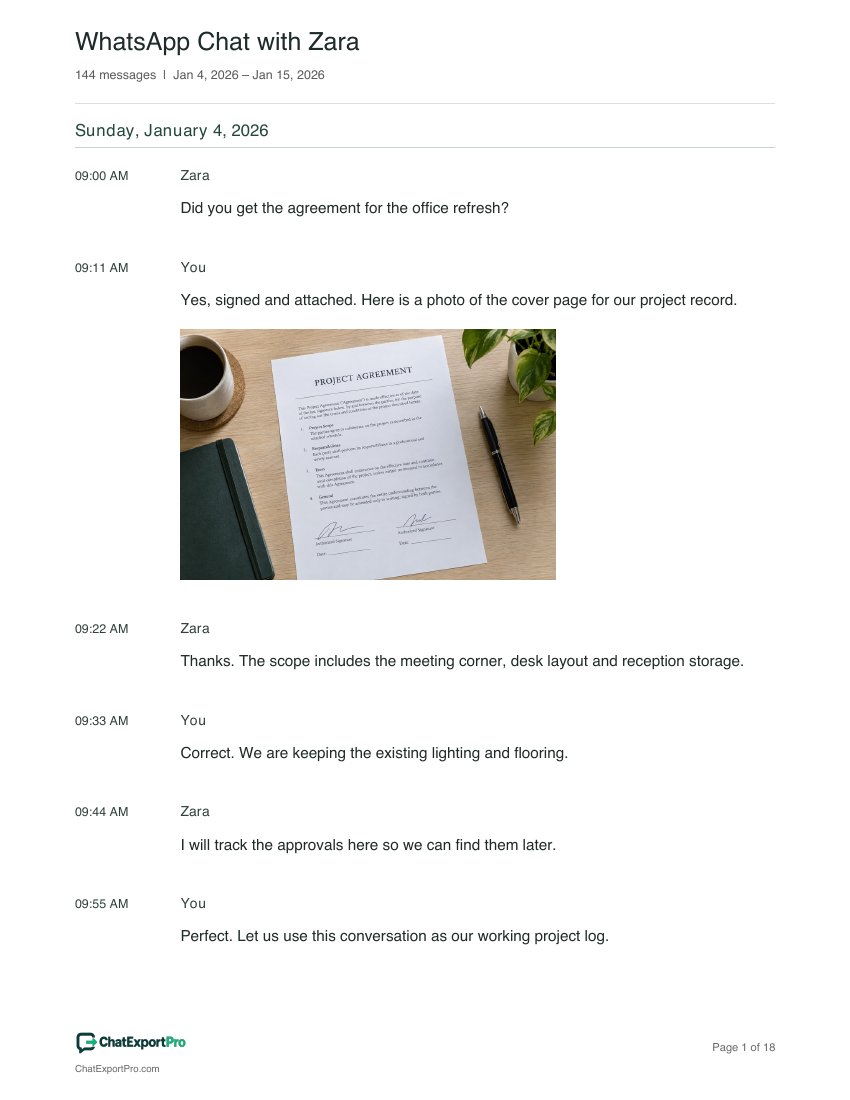
[1/4/26, 09:00:21 AM] Zara: Did you get the agreement for the office refresh?
[1/4/26, 09:11:21 AM] You: <attached: contract-photo.jpg>
Yes, signed and attached. Here is a photo of the cover page for our project record.
[1/4/26, 09:22:21 AM] Zara: Thanks. The scope includes the meeting corner, desk layout and reception storage.
Dense plain text
Media stored separately
Difficult to cite or present
→
AfterChatExportPro document
WHATSAPP CONVERSATION
WhatsApp Chat with Zara
Sunday, January 4, 2026
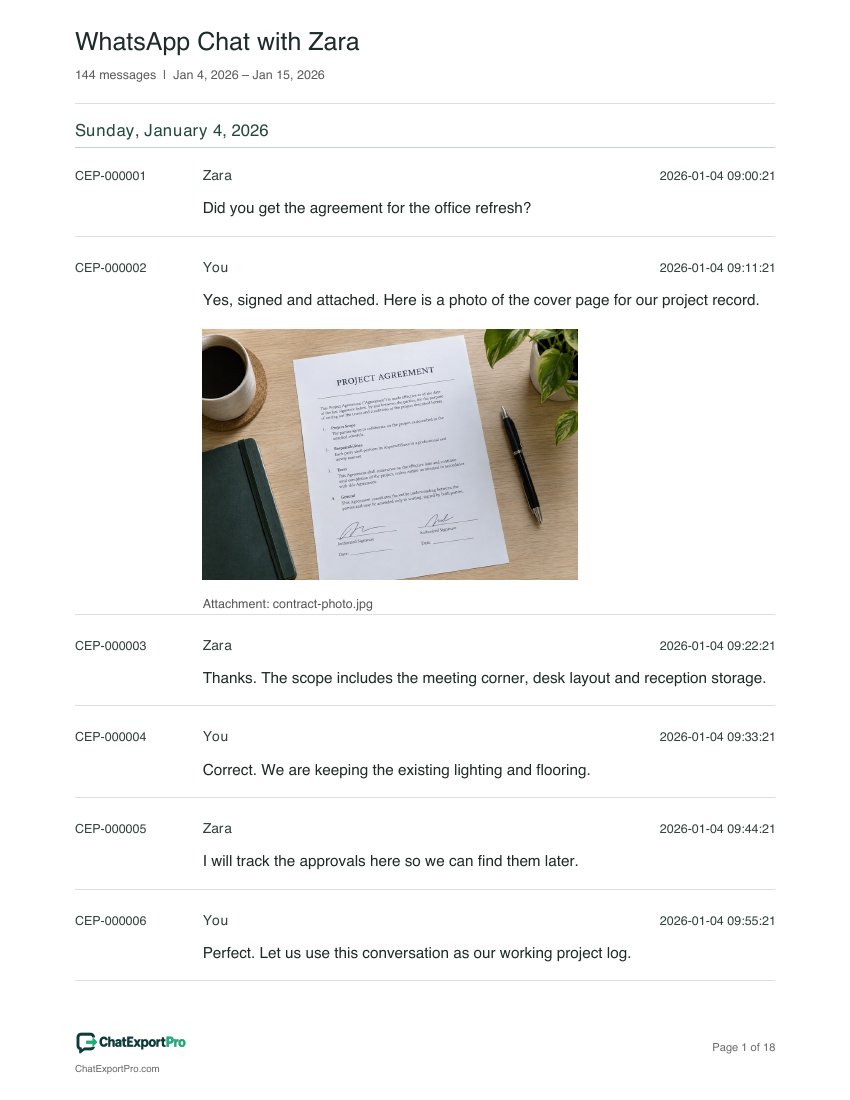
CEP-000001
Zara
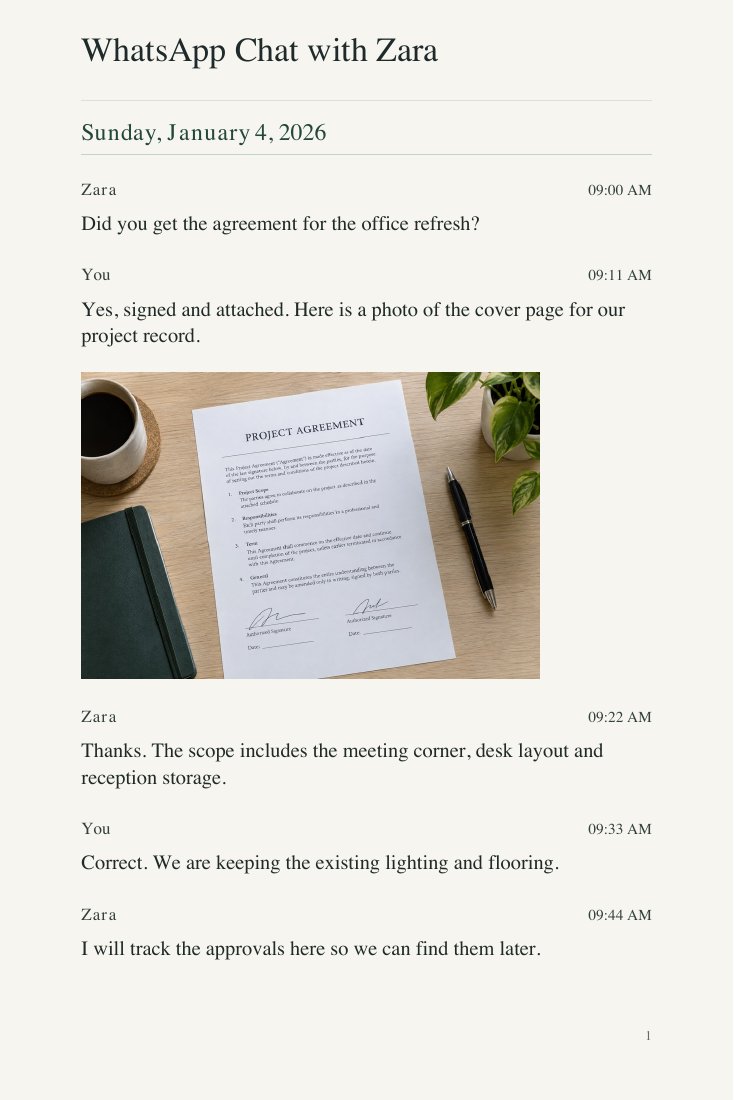
Did you get the agreement for the office refresh?
CEP-000002
You
Yes, signed and attached. Here is a photo of the cover page for our project record.
contract-photo.jpg
CEP-000003
Zara
Thanks. The scope includes the meeting corner, desk layout and reception storage.
Your private conversations should never have to leave your computer.
Many converters require you to upload an intimate conversation to someone else’s server. ChatExportPro is designed differently: the original export is read and processed by code running locally in your browser.
01You choose the fileYour browser opens the TXT or ZIP directly from your device.
02It is processed locallyParsing, filtering, previewing, and document creation happen in the browser session.
03You save the resultThe finished PDF or spreadsheet downloads straight back to your computer.
Made for the whole conversation
Less sorting. More clarity.
Preview with confidence
Check the messages, people and dates before you buy.
Choose the right presentation
Four PDF styles for printing, memories and professional review.
Keep the details together
Premium adds photos, attachment records and Excel exports.
▤Explore all document toolsFilters, photos, layouts and more — open your toolkit+
The complete local workspace
From unfamiliar phone export to a document people can actually use.
ChatExportPro now guides the import, checks what arrived, preserves optional work locally, and provides precise control over the finished record.
01
Guided phone export
Follow separate iPhone and Android steps, choose TXT or ZIP, and troubleshoot missing transcripts or media before importing.
02
Import diagnostics
Review messages, participants, date coverage, referenced attachments, packaged files, supported photos, skipped entries, and truncation warnings.
03
Optional local recovery
Save the source TXT or ZIP with its current settings in your browser’s local storage, then reopen, update, or remove it on the same device.
04
Four distinct layouts
Choose familiar Chat bubbles, a clean transcript, numbered Legal formatting, or an elegant Book-style presentation.
05
Focused filtering
Search by keyword, retain up to 20 following messages for context, limit dates, select participants, and hide system events.
06
Complete document design
Add a cover, title, subtitle, local logo, custom header or footer, page numbers, page size, margins, font size, colors, and month dividers.
07
Legal record tools
Use stable message references with a customizable prefix. Premium adds optional Exhibit and Chat ID labels, Bates page numbering, a source-file fingerprint, export metadata and a summary or declaration page.
08
Attachment intelligence
Inventory images, audio, video, and files; flag missing package items; create a PDF appendix; and include a complete XLSX attachment worksheet.
09
Photos back in context
Reconnect supported ZIP photos to their referenced messages, show or hide filenames, and place the images directly inside the finished PDF.
10
Real spreadsheet exports
Create CSV or a Excel workbooks workbook with Messages, Attachments, Participants, and Export details worksheets—ready for sorting and review.
11
Built-in and custom presets
Start with Legal review, Personal keepsake, Business archive, or Minimal print, then save up to 12 custom formatting presets locally.
12
Large-chat efficiency
Use a lightweight paged preview while complete filtered exports process thousands of messages with progress and resource warnings.
A quick walkthrough
See your first export, step by step.
A sample conversation shows how the process works.
Start with your WhatsApp file
Use Export Chat on your phone. Choose a TXT for text, or the original ZIP for photos. Open that file here; your conversation stays on your device.
Choose the presentation that fits what the conversation needs to become.
Every preview below comes from an actual ChatExportPro sample PDF. The conversation stays the same; the reading experience changes completely.
01 · Familiar and visual
Chat
Muted green and blue bubbles follow the conversation, with sender names and times together, clear date headings and optional photos. Choose from seven restrained colors.
Best for memories, relationships, and easy reading
02 · Minimal and efficient
Clean
A restrained transcript pairs an aligned time column with bold sender names, distinct date headings and readable messages and attachments, without bubble colors or per-message rules.
Best for printing, sharing, and routine records
03 · Structured and referenceable
Legal
Stable message references, senders and full timestamps make the timeline easy to cite. Customize the reference prefix; Premium adds optional Exhibit, Chat ID and page-by-page Bates numbering.
Best for attorneys, disputes, and case preparation
04 · Elegant and timeless
Book
A decorative cover, cream pages and serif typography turn the chat into a printed keepsake. The 6 × 9-inch layout balances reading space with compact pagination; branding appears only on the final page.
Best for personal archives, gifts, and bound copies
Monthly plans renew automatically until cancelled. One-time plans cover the exact file you import, including repeat downloads. A fresh WhatsApp export needs a new purchase or a monthly plan. Existing purchases can be recovered by email on another device; one-time access remains tied to its original source file.
Before you export
Questions people ask before turning a chat into a document.
Straight answers about the WhatsApp export process, privacy, limitations, and what the converter can preserve.
01How do I export a WhatsApp conversation from my phone?+
Open the conversation in WhatsApp, open the chat or contact information screen, and choose Export Chat. Select Without Media for a smaller TXT transcript or Include Media for a ZIP containing the transcript and available attachments. Save or share the resulting file to the computer where you will use ChatExportPro.
02Can I export a complete chat from WhatsApp Web?+
WhatsApp Web does not currently offer the phone app’s full Export Chat action. For a complete TXT or ZIP archive, open the conversation in WhatsApp on your iPhone or Android phone and choose Export Chat. Copying or printing messages from the web interface captures only what is visible.
03Will exporting a conversation alert the other participants?+
WhatsApp’s normal Export Chat process creates a copy on your own device and does not post a message in the conversation. You are still responsible for handling the exported material lawfully and respecting the privacy of everyone involved.
04Will deleted messages appear in the PDF?+
ChatExportPro can format only what WhatsApp includes in the source file. A deleted message may appear as a deletion notice, but the original words or attachment cannot be recovered by the converter.
05Is Export Chat the same as a WhatsApp backup?+
No. Export Chat creates a readable TXT transcript, or a ZIP containing the transcript and available media. A WhatsApp backup is intended to restore your account inside WhatsApp and is not a normal document for reading, printing, or conversion.
06Can I convert a group conversation?+
Yes. Group exports retain the participant names, dates, times, messages, and supported system events contained in the original export. ChatExportPro also lets you filter participants before creating the final document.
07Does my chat get uploaded to ChatExportPro?+
No. The converter parses, previews, filters, and generates files inside your local browser. Your conversation is not sent to a ChatExportPro processing server. The working session clears when you close it unless you explicitly choose Save this project, which keeps the source file and settings only in this browser for local recovery.
08Can my photos appear inside the exported conversation?+
Yes. Choose Include Media when exporting from WhatsApp, then open the resulting ZIP in ChatExportPro. WhatsApp places the transcript and media in separate files; ChatExportPro matches supported photos to their message references and places them back into the conversation layout. You can include or omit photos and their filenames before saving the PDF.
09Which files can I use?+
Use the TXT file created by WhatsApp’s Export Chat feature or the ZIP package produced when media is included. ZIP imports reconnect supported photos and inventory referenced images, audio, video, and documents. ChatExportPro produces PDF, CSV, and Excel downloads.
10Can it handle very long conversations?+
Yes. The preview is intentionally limited to a few pages while exports are generated from the complete filtered conversation. This keeps the interface responsive even when an archive contains tens of thousands of messages.
Private conversations. Professional documents.
Ready to turn the chat into something useful?
Start with the sample, then privately preview your own export in the browser.